First, in the introduction I suggested that many sites with widely varying purposes -- for example, on-line publishing, ecommerce, and intranets -- nonetheless require a common core of functionality in the code that supports their operations. The reader may well find this suggestion hard to imagine. Therefore a main purpose of this chapter is to present a number of specific examples of sites built with the toolkit whose common features and underlying philosophy support this claim.
Second, in the introduction I also suggested a novel philosophy of administration: an administrator should think of his role as the leader of a community and not merely as editor of individual interactions. Since understanding this philosophy is key to being able to successfully administer a site as it grows, and this role is made possible by the capabilities described in this section, I want to take this opportunity to explain in detail how this strategy is applied in specific examples.
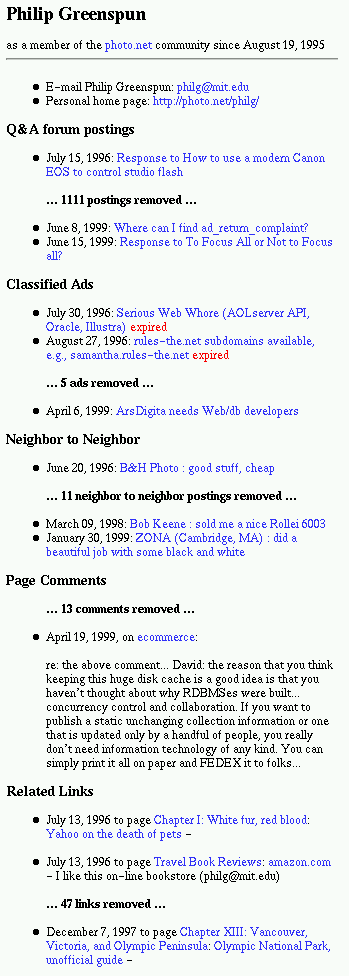
One of the features of photo.net of which Philip is the most proud (justifiably) is the community member history pages. On this page every contribution by a particular user is displayed in one place. From this page one can learn the interests, habits and personality of another user. At the right, we see (an abridged view) of the community member history for the community's oldest member. If you wish, you can also view the complete version. An administrator can see another version of this page that offers even more information about the user: contact information, demographics, a record of all the searches initiated by the user, the mailing lists the user has signed up for, and a record of all the static pages the user has viewed while registered on the site.
The capability to display these histories is impressive because it draws on the functions of all the other modules: it would not be possible except in a fully-integrated toolkit like this one. The aim of building these community member reports was one of the main goals of the toolkit from the very beginning. For example, Philip asserts in his description of the benefits of the bulletin board module that the bulletin board's most important benefit is the data it collects for display on the community member history pages. From the description of the motivations behind the design of the community system given in his book, it is clear that Philip considers the user-tracking capabilities the payoff for the effort of building an integrated toolkit. Why are these capabilities so important to him?
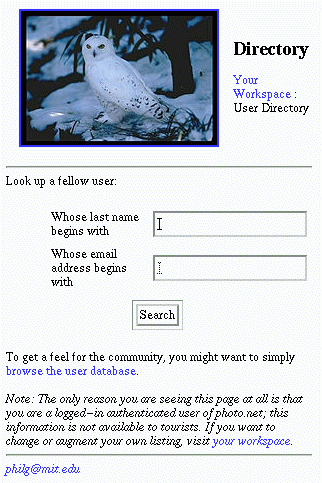
One reason is that the community member history pages make it possible for the assortment of unacquainted people who visit a site to get to know each other. Users can look each other up in the directory (shown above) and see each other's full interaction summary. In addition, as Philip describes in his description of the classified service, community members can use the member history pages to figure out which users they can trust. Trust is essential if community members are going to buy and sell from each other, or work together, or do anything else for which they need to feel they can rely on each other.
However, the main reason Philip thought it was so important to gather comprehensive data about users, is not the capabilities it offers ordinary users, but the power it gives to administrators. As photo.net grew from 33 registered users in August 1995 to over 33,000 in August 1999, Philip found that eventually the moderation burden got out of hand. Visit http://photo.net/shared/new-stuff.tcl to view all the new stuff that has been submitted to photo.net in the last week: this is the amount of material that an administrator has to read through each week. When I checked it was more than twenty pages long, and it doesn't include the new messages in the bulletin board forums -- for instance, the 1323 new messages in the photo.net Q&A forum. As Philip said in his description of the Big Problem in site administration, "Site growth can outstrip the capacity of any person, no matter how dedicated or efficient." He was talking from personal experience. Faced with a task of this magnitude, Philip realized he needed a new strategy to handle the moderation of photo.net. The community tracking functions are the key to the new strategy he devised: this is why he considers them so important. They are useful in two ways:
First, user contributions that demand attention from the administrators tend not to appear randomly: particular users cause most of the trouble. The community member histories help the administrator identify those users and allow him to nip the problem in the bud.
Second, the summaries of the user's activities help identify the most active contributors, who may well be willing to turn their energies into aiding with the moderation task. It is a mistake for the administrator to assume that he is the only one who cares about about keeping the site in good shape: many of the most involved community members care as much or more than he does, and will be quite willing to help maintain the site if given the power to do so.
The moral of this story is: it is much more efficient
for an administrator
to focus on managing of the community by promoting the most
energetic members and banning the most destructive ones, than to
try to manage each of the interactions of the community individually.
The community member history page is the tool that allows
the administrator to learn about his community so he can effectively
implement this strategy.
Philip has also built into photo.net a system that takes
this principal one step further: the Member Value Module.
Here is the description he gives of the purpose of this module
from the chapter of his book discussing the design of the
community system:
Even if you're a classically greedy commercial publisher, pricing user
activity on the Web presents some paradoxes. Traditionally people are
willing to pay to run classified ads in magazines. So obviously you
should charge people for every classified ad posted. But once you've
installed the ArsDigita Community System, the marginal cost of letting a
user post a classified is $0. If people come to your site to look at
this classified ad and also view banner ads, then actually you should be
willing to pay the reader for posting a classified ad! That seems
logical until you think about the fact that every classified ad user
presents a statistical chance that you will need to invest customer
support resources in (1) deleting a duplicate ad, (2) editing an ad, (3)
assisting the user if he can't figure out what you thought were
self-explanatory forms, and (4) dealing with bounced email to that user,
etc. I explicitly designed the ACS classifieds to have a zero support
cost but in practice operating the photo.net classifieds seems to have
chewed up about 30 minutes of my time for every 1000 ads posted.
In the off-line world, it is tough to set "pain-based prices". The
publisher is expected to charge all the users equally and spread
customer support costs among them. In the online world, there is no
technological reason not to charge people for the costs that they
impose, though it may seem confusing to customers. For example, if I
place a classified ad in a newspaper and then call to cancel it, I
wouldn't expect to be charged. Yet in the online world, a user who
places an ad and then telephones your customer service number has cost
you 100 times as much as a user who merely places an ad. It makes sense
to charge people according to how much customer service time they've
burned up and you might even be able to explain that to them.
In the off-line world, recognizable contributions from customers come
almost exclusively in the form of money. If Jane Smith recommends her
Ann Taylor jacket to a friend, neither the Ann Taylor manufacturer nor
retailer is likely to ever find out. In the online world, a customer
can contribute to an online community by posting an interesting question
in a discussion forum, answering someone else's question, buying
something from a merchant that gives the community a kickback, writing a
static article, or filling out a form recommending the community to a
friend (who will then receive an e-mail invitation to join).
With a public community site you might decide to charge users for
viewing certain pieces of content, even though the marginal cost of them
doing so is nearly zero. You could make this decision to charge simply
because you're greedy or because you're trying to defray the high
average cost of producing content. The ArsDigita Community System lets
you attach prices to individual pages. Note that these prices can be
negative--you can pay users to read pages that are important to
you or the community.
Member Value
Commercial publishers and service operators are interested in how much
customers are worth to them because they expect to get money from them.
However, non-commercial and intranet communities also need to know which
members are valuable and which are imposing a burden on the community.
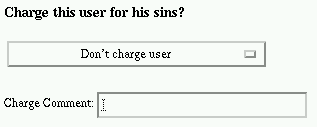
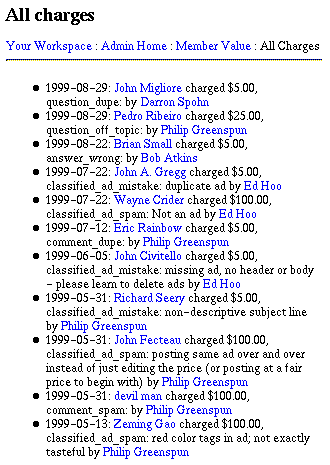
This is the principle. How does it work in practice? In photo.net, whenever an administrator needs to delete or edit a posting, or is required to do any work because of a users action, he is given an option to assign a charge to the user. For example, the image of the form shown at right is taken from the bottom of the page on which an administrator can edit a classified ad. The select box shown in the image is reproduced below.
Notice that the administrator does not actually assign a monetary charge to the user; he simply enters the severity of the sin. The publisher can decide for the whole site how much each category of mistake is worth. Photo.net does not actually bill the users who have sinned, but nonetheless the charge records are useful to the administrators to identify difficult users. If a user is particularly incorrigible, he can be banned from the site. In the case studies chapter in his book, Philip describes his first experience banning a user:
Personally I didn't mind having Martin as a community member despite his eccentric belief in the quality of the Minox's 8x11mm negatives. However, he'd apparently previously annoyed folks in rec.photo.* (USENET) exchanges and even the slightest error on Martin's part provoked a volley of vitriolic responses from other photo.net readers. Every day I'd have to go in and clear out 50 postings plus respond to private e-mail complaints.
My forums at the time were backed by the Illustra relational database management system, the child of some self-professed computer science geniuses at UC Berkeley. They spent a lot of time writing papers for academic journals about how stupid the engineers at Oracle were. Indeed, Illustra did quite a few things that Oracle could not. For one user at a time. If you wanted to update an Illustra row, you had to wait for all the readers to stop reading. If you wanted to read from an Illustra row, you had to wait for all the writers to stop writing. The bottom line was that, as soon as you had more than one person using Illustra, the system tended to deadlock. Under the best of circumstances, users posting to the forum would get a page saying
Under heavy usage, the users would seeplease wait while we try to insert your message ..... message inserted.
please wait while we try to insert your message ..

*** 60 second pause *** ...

deadlock, transaction aborted.

Please hit Reload in five or ten minutes.
I felt humiliated by the situation but for a variety of annoying reasons, it was taking me months to move my services to Oracle. Then it hit me: Sometimes a system that is 95 percent reliable is better than a system that is 100 percent reliable. If Martin was accustomed to seeing the system fail 5 percent of the time, he wouldn't be suspicious if it started failing all of the time. So I reprogrammed my application to look for the presence of "Martin Tai" in the name or message body fields of a posting. Then Martin, or anyone wanting to flame him, would get a program that did
ns_write "please wait while we try to insert your message ..."
ns_sleep 60
ns_write "... deadlock, transaction aborted.
 Please hit Reload in five or ten minutes."

The result? Martin got frustrated and went away. Since I'd never served him a "you've been shut out of this community" message, he didn't get angry with me. Presumably inured by Microsoft to a world in which computers seldom work as advertised, he just assumed that photo.net traffic had grown enough to completely tip Illustra over into continuous deadlock.
I've used this trick a few more times in the photo.net forums with users who wouldn't take gentle suggestions from the moderators. Even though I've subsequently converted to Oracle, so that message insertion is 100 percent reliable and takes one-tenth of a second, no user has ever suspected foul play when presented with a "database error" page.
The general rule to be extracted here is to take advantage of the world that Microsoft has created. Don't tell users that you hate them. Just program your server so that it can pretend to be broken.
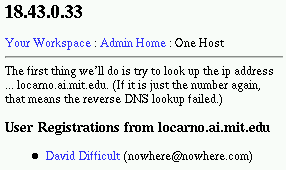
The community system does not require that you use this trick on banned users: you can choose whether a user is shown an error or told explicitly that he has been shut out. The ArsDigita web infrastructure has gotten so reliable that I am not sure the user will be fooled by this trick anymore. However, if you forego this trick and tell a user explicitly that he is banned, the danger is that he may return to register again under a different user name. The community system has a defense against this kind of persistent troublemaker: the administrator can view the IP address from which a user has registered, and request a report of all the users who have registered from that IP address. In this way, sneaky double identities can be unmasked. (The report shown at right reveals that David Difficult is a construction of the author's imagination.)
So we have come to the end of our review of the strategies the photo.net
administrator can use to handle difficult users. To summarize,
the administrator
can assign users charges using the member value module and,
if they become too burdensome,
ban them from the site entirely. In addition, particularly helpful users
can be promoted to co-administrator using the User Groups module.
This allows the administrator to protect himself from difficult users and
benefit from the enthusiasm of the most active users. In
the next example we will see a variation of these same strategies applied
in a quite different context: ecommerce.
 Having read thus far, you may be asking yourself, "Well, this community
stuff is all very well if you are an artist dying for attention, but I
am a practical businessman and I want to make money.
Where's the profit in all this?"
To answer this question, we turn now to discuss ecommerce. I want
to show how the same principles and strategies that can simplify the
administration of an on-line publishing site can also ease the burdens
of managing an ecommerce site.
At first glance, this may seem like a strange idea,
because an ecommerce site has to face different challenges: few
ecommerce administrators have to contend with 1,323 submissions
to review and edit each week. But the administrator of an ecommerce site
has to face his own brand of challenges: customers service
disputes, return handling, and the ever-present need to maintain
a decent profit
margin while still pleasing the customers. In facing these
challenges, the philosophy of community-centered management may
benefit an ecommerce administrator as much as it helps an
on-line publisher.
In his statement of Arsdigita's ecommerce strategy Philip discusses the
role of community in ecommerce:
Having read thus far, you may be asking yourself, "Well, this community
stuff is all very well if you are an artist dying for attention, but I
am a practical businessman and I want to make money.
Where's the profit in all this?"
To answer this question, we turn now to discuss ecommerce. I want
to show how the same principles and strategies that can simplify the
administration of an on-line publishing site can also ease the burdens
of managing an ecommerce site.
At first glance, this may seem like a strange idea,
because an ecommerce site has to face different challenges: few
ecommerce administrators have to contend with 1,323 submissions
to review and edit each week. But the administrator of an ecommerce site
has to face his own brand of challenges: customers service
disputes, return handling, and the ever-present need to maintain
a decent profit
margin while still pleasing the customers. In facing these
challenges, the philosophy of community-centered management may
benefit an ecommerce administrator as much as it helps an
on-line publisher.
In his statement of Arsdigita's ecommerce strategy Philip discusses the
role of community in ecommerce:
Since 1995, we have built and operated six sites that accept credit card orders from consumers. We are now operating ecommerce services with our standard ArsDigita Community System toolkit because it turns out that there is almost always a substantial need for collaboration between customer service staff and customers, e.g., to provide technical support. We've always done the obvious things like relationship management and customer value management, but since 1998 we've extended our software with an eye toward achieving "mass customization, 1:1 marketing, disintermediation, and whole product management" (requirements from one of our customers).
I pointed out in the first chapter
that the ecommerce buzzwords like "lifetime customer value management" are
the same as the concept of Member Value that Philip developed
for photo.net. Now it is time to show off these ideas in action.
First, let us look at the result of ArsDigita's efforts in
"mass customization, 1:1 marketing, disintermediation, and whole product
management":

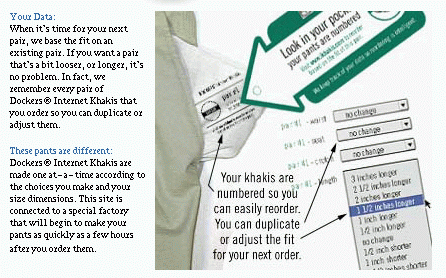
The Site: Arsdigita built a site for Levis that allowed users to order khakis custom-built to their measurements. Here is the description the site itself gives of the capabilities it offers:
Your Choices:
Your Size:
Your Data:
You need to get exactly what you
want in an effortless way, and so
we've given you the choices you
care about: pleats, cuffs, fabric and
color. We take care of everything
else, so whatever combination you
choose adds up to a classic pair of
khakis.
You need to know that these pants
are going to fit, and that's why
DockersŪ Internet Khakis lets you
choose waist and length sizes to
the 1/2". We also use your
individual measurements, weight,
height and shoe size, to choose a
pattern that is the best match to
your dimensions.
When it's time for your next pair,
we base the fit on an existing pair.
If you want a pair that's a bit
looser, or longer, it's no problem. In
fact, we remember every pair of
DockersŪ Internet Khakis that
you order so you can duplicate or
adjust them.
One of the managers at Levi's who ran
this project made a comment that made a deep
impression on me. He was talking about the difficulties of designing
a factory that was capable of taking custom orders and delivering
finished pants within a period of time the customer was reasonably
willing to wait.
 Throughout the process, he said, he had to fight against the entrenched
mindset of people trained in factory-design. Their mindset demanded that
every process in the
factory must be done as efficiently and cheaply as possible to achieve
the maximal productivity from the factory. Therefore they rebelled
against the idea of cutting each pair of pants to a new pattern.
"Look," he told the design
people, "if you make a pair of pants in the most efficient
manner possible, and then it goes and sits in warehouse for two months,
then sits on a store shelf for three months, then goes down to the
bargain basement for two weeks, then gets returned to the warehouse to
sit for another few months, and finally ends up in discount store to
be sold for a fraction of its value, you have NOT increased the
productivity of this factory." His point was, even though the factory
is somewhat less efficient when it sews custom-cut pants,
it is in fact much more productive
because it has a nearly total guarantee that every pair of
pants it made would be sold immediately. In fact, the factory
gets the money for the pants from the customer even before they
begin to cut the fabric. This comment is noteworthy because
it seems to me to herald the real
productivity revolution that the Internet will make possible.
Throughout the process, he said, he had to fight against the entrenched
mindset of people trained in factory-design. Their mindset demanded that
every process in the
factory must be done as efficiently and cheaply as possible to achieve
the maximal productivity from the factory. Therefore they rebelled
against the idea of cutting each pair of pants to a new pattern.
"Look," he told the design
people, "if you make a pair of pants in the most efficient
manner possible, and then it goes and sits in warehouse for two months,
then sits on a store shelf for three months, then goes down to the
bargain basement for two weeks, then gets returned to the warehouse to
sit for another few months, and finally ends up in discount store to
be sold for a fraction of its value, you have NOT increased the
productivity of this factory." His point was, even though the factory
is somewhat less efficient when it sews custom-cut pants,
it is in fact much more productive
because it has a nearly total guarantee that every pair of
pants it made would be sold immediately. In fact, the factory
gets the money for the pants from the customer even before they
begin to cut the fabric. This comment is noteworthy because
it seems to me to herald the real
productivity revolution that the Internet will make possible.
This kind of product personalization would not be possible without an ecommerce system built around a powerful users model. My friends were terribly impressed by the tag in the pocket of my pants, but a pair of pants with a serial number in the pocket is not in itself so impressive. What they were really impressed by, I think, was the idea that there was a computer somewhere that knew what kind of pants I wore, so that next time I wanted new pants I could simply ask for "another one like that but a bit shorter." Its funny, because in general people seem terribly threatened by the idea that computers will know stuff about them; but in this case everyone I met seemed to think it was wonderful. I suppose when people think of mysterious computers out there that know about them, they think of the IRS or the FBI, neither of which carry very pleasant associations. It is a new idea to people that computers can also use their data to do "mommy tasks" like "my pants are uncomfy: get me a better pair." When consumers realize that computers can hold "mommy wisdom" that will make their lives more pleasant, their attitude toward these distant computers may change drastically.
 I cannot show off the administrative features of this site itself
because the data in it is proprietary. However, whenever ArsDigita's programmers do an
interesting project for a customer, they take the best features
developed for the commercial site and add them to the toolkit as a new
module. In this case, most of the features built for the Dockers site
have found their way into the ecommerce module in the
toolkit. The module will be used to support the site of BostonShopSimple.com,
a Boston-based ecommerce site, and future ArsDigita ecommerce projects.
I will show off the administrative features built into this ecommerce
module, and from this example we can get an idea of what the administration
of a ecommerce site built by ArsDigita is like:
I cannot show off the administrative features of this site itself
because the data in it is proprietary. However, whenever ArsDigita's programmers do an
interesting project for a customer, they take the best features
developed for the commercial site and add them to the toolkit as a new
module. In this case, most of the features built for the Dockers site
have found their way into the ecommerce module in the
toolkit. The module will be used to support the site of BostonShopSimple.com,
a Boston-based ecommerce site, and future ArsDigita ecommerce projects.
I will show off the administrative features built into this ecommerce
module, and from this example we can get an idea of what the administration
of a ecommerce site built by ArsDigita is like:

Compare this image of a a customer service summary page from the ecommerce module (at right) with the administrator's version of the community member history page from photo.net. Though the information on the page is different, the basic form of the page is the same. This similarity is no accident: we can think of a seller and a buyer as members of a community trying to accomplish something together. Just as a member of a photography community might like to see all the contributions made by another member of the community listed together, a customer service representative will want to see all the actions of a customer summarized on one page.
However, to use this data only to benefit the customer service agent shows a lack of imagination about the true potential of an ecommerce web site. Think about what the ecommerce buzzwords like "1:1 marketing" and "disintermediation" really mean. "1:1 marketing" means that an merchant doesn't have to guess anymore who his customers are. No more of this "18 to 24 demographic" stuff: he knows his customers by name. What's more, he knows their whole history of purchases and interactions. "Disintermediation" means that the middleman is removed. Even if the merchant is a huge factory a few thousand miles away from the customer, for the potential buyer he fills the role of the little shop around the corner. This means the merchant inherits the relationship the customer had with the corner shop. In the little shop, the shopkeeper slipped candy to the kids of his regular customers: the customer may well fell dissatisfied and alienated if he cannot build similar relationships to replace the ones he has lost.
In addition, ecommerce sites have the same kind of problems handling the administrative burden as they grow that publishing sites have. Why? Administrators don't have 1,323 submissions to edit each week. But they have their own problems. In the chapter So You Want to Join the World's Grubbiest Club: Internet Entrepreneurs of his book, Philip discusses the difficulties:
Internet commerce is the most obvious method of making money from a
popular site, but it may not be the best. Internet commerce appeals
deceptively to a particularly male fantasy. Guys like the idea that after
a short initial period of programming, a computer will tirelessly slave
away for them, making them money 24 hours a day. Set up the site, walk
away, and watch the money pile up in your bank account.
You can feed this fantasy by reading articles in the business press
about http://amazon.com, the perennial
poster children for Internet commerce. They set up what is essentially a
front-end to a wholesale book distributor's database, and now they are
selling books every few seconds. It sounds like they are rolling in
money.
Well, it turns out that I know some people who work at amazon.com. The
customers don't always fill out the forms exactly right. The books
aren't always in stock like they should be. The customers send e-mail
asking when their books are going to be shipped. So instead of one Unix
box and a big vault for the cash, the company has hundreds of employees sucking
all the money out of it (they lost $34 million on $307 million in sales
during the 12 months ending in June 1998, according to quote.yahoo.com). And
remember, this is the best that anyone has really done: high expenses
and high sales. More typical is an Internet store with high expenses and
low or no sales.
So the Big Problem of the runaway
administration burden that Philip faced
as photo.net grew will strike down ecommerce sites as well. Ecommerce
sites may well want to try a similar solution: after all, they have detailed
data on the behavior of their customers, so why not use it? In ecommerce
sites, as in publishing sites, there is an idea of valuable customers
and expensive ones. The valuable customers fill out forms accurately
and completely, tolerate understandable delays, return items only
when there is a real problem, and come back often. The expensive
customers complain unreasonably, fill out forms badly, damage items before returning them, and
generally make themselves more trouble than they are worth.
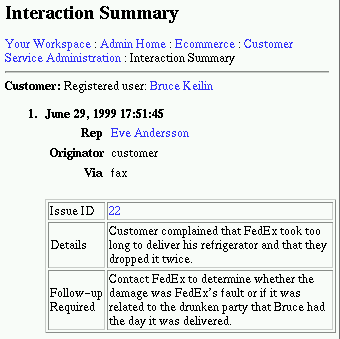
For example, the (fictional) customer shown here seems to be causing problems.
At the right we see the top portion of his interaction history.
Above we see that his credit card has been rejected once and
only grudgingly accepted the second time (authorized_minus_avs
means that his credit card number matched but his address didn't --
avs stands for Address Verification Service).
I think he may soon qualify for the David Difficult category.
The administrator
can save himself a good deal of trouble and expense by cultivating the
good customers and protecting himself from the expensive ones.
After all, this idea is not new:
the corner shopkeeper has an idea of his good customers and his not-so-good
ones, and he treats them differently. When the web merchant tries to
"disintermediate" and take over the role of the corner shopkeeper, he might
as well stop to take a lesson from his real-world counterpart.

But how is an ecommerce site going to handle David Difficult? It
is unlikely to want to ban him entirely, as Philip might do in photo.net.
Difficult as he may be, he is still a paying customer. Similarly,
what can it do to reward Rachael Supergreat? In photo.net, a similarly
valuable community member
might be offered a job as a co-administrator, but that kind of offer
is unlikely to interest even a very loyal customer. Enthusiastic
people volunteer to edit magazines, but they don't volunteer to
mind stores. An ecommerce site needs another method. However, an ecommerce
site has an advantage over photo.net:
even though photo.net keeps track of member value in dollars, it would
have difficultly actually charging people because it has no infrastructure
in place to collect money. A ecommerce site does have this infrastructure,
and what's more, they don't even have to charge people explicitly:
they can just adjust the prices a customer sees for the services they
are already looking to buy. If the administrator doesn't want to touch the prices,
they can adjust other aspects of the offer, like the shipping time, as
Philip suggests in his example prescription for the business rules of a lifetime customer value management
system. So Rachel Supergreat can be encouraged to return with sweet deals,
while David Difficult can be gently discouraged with high prices or long
waits. In the next section I will show the features that an administrator
can use to implement this strategy.

 After much begging, she grants my request.
When I return to the page listing the price of Philip's book,
I see that
"Nerds" are offered a special discount price.
If I did not know the group existed, I would never
have known of the special price. (This whole scenario
is fake, by the way, though if you go to Philip's seminars,
he may give you a copy
of his book at Nerd prices.)
After much begging, she grants my request.
When I return to the page listing the price of Philip's book,
I see that
"Nerds" are offered a special discount price.
If I did not know the group existed, I would never
have known of the special price. (This whole scenario
is fake, by the way, though if you go to Philip's seminars,
he may give you a copy
of his book at Nerd prices.)
User classes can be used in many ways. It is easy to email to all the customers in a class, and one can use this feature to issue the customers coupons or notify them of special offers. Different classes of users may also see different versions of the product reviews. In this way, it is easy to selectively encourage groups of customers, or show them offers targeted to their interests or known buying patterns.
In this way, an ecommerce administrator can set up
a system whose effect is very similar to the
system of "pain based prices" that Philip proposed
earlier for a publishing site.
Users of an ecommerce site who have caused a pain
to the company can be assigned to
a class which sees higher prices, while
the customers making the most money for the company
can be entered into a class which receives special
coupons and notices of the best deals. This basic
strategy of administration is very similar to the
one I presented for photo.net: only the details
of implementation have been appropriately adapted to
this new situation..
First, just as in a public community, in a company site
members will wish to see a summary of the contributions
of other members so they can get to know their co-workers.
Here we see this feature displayed in a site built for
internal use by Siemens corporation:
We leverage our local innovations globally.
We are a community committed to increase value for our customers and ICN by creating and re-applying leading-edge solutions.
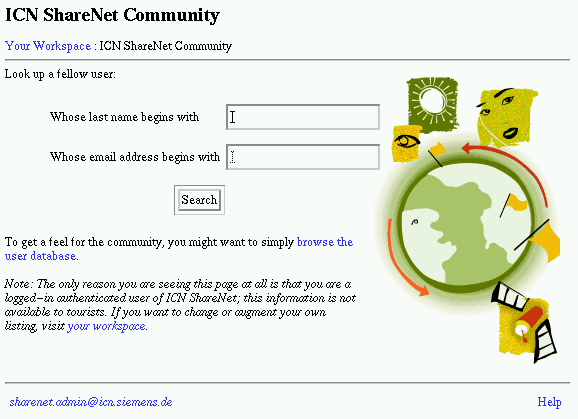
The Sharenet site provides a user directory that allows users to search or browse to quickly find another user of the system. The directory leads to a Community Member page for each user, like the one shown above for photo.net. However in this case it lists all the knowledge management sales/service activities of the user in question. In this way a salesperson at Siemens can easily keep track of the activities of the other salespeople, facilitating collaboration and group coordination. That much less time will have to be wasted in long Dilbert-esque meetings!
Compare this page to the user directory shown for photo.net (the image with the owl at right). These pages are very similar, showing their common origin in the ArsDigita toolkit. However, the necessary adjustments have been made to integrate each page with their respective websites. The adjustments are very easy: almost all of them can be made just by changing the entries in the main configuration file for the system.
As an aside, the images on these pages are worth commenting upon: the community system toolkit supports graphic decoration to spice up dull text-only pages. The design of the system ensures that the graphics will not impeding navigation or the speed of page loading. As you can see from these examples, the placement of the images is quite flexible, so the toolkit can support a variety of different looks. Even though these two pages have almost identical text, they convey quite a different impression. I have to admit that Sharenet graphics better communicates the purpose of the page in its corporate graphics design kind of way, but I love that owl.
The perceptive reader may have noticed the text on the images above
that refers to the users workspace. (The page directs readers who wish to
edit their own listing to visit their personal workspace.) The
workspace is an important part of any site whose purpose
is to allow people to work together, for it is the place from which a
user can manage his own personal data and contributions.
It would be roughly analogous to a person's personal desktop on a computer
that allowed multiple logins. In one sense it is more limited than
a workstation's desktop, because
it only supports a few types of activities, but in another sense it is
more powerful, because it allows more people to work together
in more flexible ways on those activities. In the
next example we will show how the users workspace can be used and
customized in a web project.
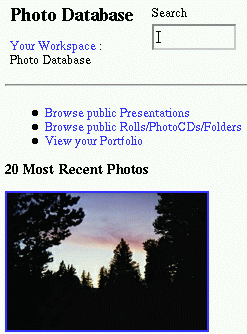
The Photography Management Service allows photographers to organize and share their photos.
Photos are jpgs, gifs, and Kodak PhotoCD files (.pcd) uploaded through your browser. The Management service lets the photographer save information (e.g. caption, camera and film type, date) about each photo as it is uploaded. The system creates thumbnails that can be accessed on the WWW that link back to this information.
Photographers can share their photos in two ways. First, individual photos can be made available to the public for browsing or searching. Second, the photographer can create a presentation. A presentations exhibits a selected group of photos about a topic for a specific audience.
Photographers organize and manage their portfolio of photos and presentations. In their portfolio, photographers can store additional information about each photograph with custom data fields.
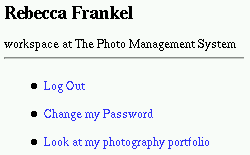
The functions described above can be accessed from a user's personal
workspace. In a general community system, the personal
workspace allows each user to view or update their contact information,
change their password, or edit their email alerts.
Custom applications
can add entries to a user's workspace, to allow for application-specific
capabilities. Compare the image
at right with the image of my workspace from photo.net.
In a publishing site like photo.net, the workspace also has links
to the main sections of the site, to a page that lists
all the new content that has been entered recently on the site, and
to any special administrative roles the user has been granted.
A site that allows users to enter private information,
like this photo database, will include links to the user's personal data.
In this case, I get a handy new link in my
workspace which allows me to check out the state of my personal photography
portfolio. In the next two case studies we will see two more examples
of the user workspace in action.
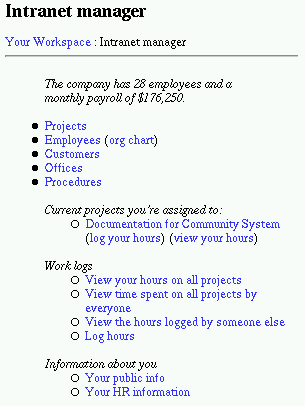 The photo database is an example of a system that allows users
to manage their personal projects. Now we turn to examine a system
that allows a community to manage a shared project -- the
work of a company. Philip considers the development of
community tools for internal business use one of the major frontiers
of development for Arsdigita in the future:
The photo database is an example of a system that allows users
to manage their personal projects. Now we turn to examine a system
that allows a community to manage a shared project -- the
work of a company. Philip considers the development of
community tools for internal business use one of the major frontiers
of development for Arsdigita in the future:
Above we see my personal view of the intranet which I can call up from my personal workspace. The system knows who I am: it knows what projects I am assigned to and offers me links to my personal information. In addition I can view all the shared information from this page. I can find out who is working at ArsDigita, what projects they are working on, which customer commissioned which project, who the new prospective customers are, and many other useful tidbits of information about the company's operations. In addition, if I drill down a bit I can discover detailed information on the number of hours of work each project has soaked up so far, and where people are spending their time. For example, the page that lists all the active project contains a link to the intranet manager (for of course the construction of this module is itself one of Arsdigita's projects), and if I click on this link I can discover that the current version took David Rodriguez 100 hours to build. In addition, I find a note from Philip:
OUR OPERATIONS AND THE INTRANET MODULE We are going in front of Andersen in Dublin on
October 13/14. We need to have a really impressive Intranet module to demo. We also need to make our
operations better. Some quick things for the module: a) we need a virtual time card page that shows all of a
person's projects and enables them to enter time for a whole week at a time (or go day by day). This should be a
convenient table with a single submit button. b) we need deadlines for projects and alerts of various kinds. A
person ought to be able to go in and ask "which project is most behind schedule?" c) we want to put some cost
accounting into the intranet module so that I can ask "what projects are losing money?" (this means we have
to also have monthly fees in there for each project). This can be rough but we want to make the point. d) we
need a project-based knowledge management system in the intranet module deadline: August 30 (Andersen is
flying someone over that week to check up on presentation)
The software tells me that two new people have been added to the project in
late August. I can also see from this page that five hours have recently
been logged by a team leader, who described her activity as:
"Met w/Tracy, David and Malta about project requirements.
Ran report templates for David." (Malta is one of the new programmers
on the project; Tracy is another team leader who we will introduce more
formally in the next section).
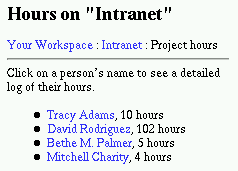 Also I see that Mitchell, the
other new person on the project, has logged
four hours,
reporting that he "Added chat module, AIM buddy file
auto-generation, proselytized." That's a lot of work for four hours!
I suppose this is an example of the productivity the toolkit makes possible:
the chat module, which is already built and tested, can be quickly made
to work in this new context. It seems like they are successfully
ramping up to build the next generation intranet.
Even so I wonder if they have a chance to meet
Philip's insane August 30 deadline given that
the project requirements meeting
was on August 23. Seven days to build a project-based knowledge
management system? Well, ArsDigita has
already built one for Siemens, and they
have almost certainly begun to convert
the code written for the Siemens' project into a generic module, since
that is the ArsDigita's habit with every project they do.
Therefore they probably have some
generic "project-based knowledge management" code
lying around, which they could hook up into a new project in ... seven days?
Also I see that Mitchell, the
other new person on the project, has logged
four hours,
reporting that he "Added chat module, AIM buddy file
auto-generation, proselytized." That's a lot of work for four hours!
I suppose this is an example of the productivity the toolkit makes possible:
the chat module, which is already built and tested, can be quickly made
to work in this new context. It seems like they are successfully
ramping up to build the next generation intranet.
Even so I wonder if they have a chance to meet
Philip's insane August 30 deadline given that
the project requirements meeting
was on August 23. Seven days to build a project-based knowledge
management system? Well, ArsDigita has
already built one for Siemens, and they
have almost certainly begun to convert
the code written for the Siemens' project into a generic module, since
that is the ArsDigita's habit with every project they do.
Therefore they probably have some
generic "project-based knowledge management" code
lying around, which they could hook up into a new project in ... seven days?
In any case, I hope it is clear from this example how the
intranet module can be used to learn about the state of a project and the
progress of the people involved.
If people reliably report on their activities, it can be a
powerful tool to monitor the progress of a company's projects.
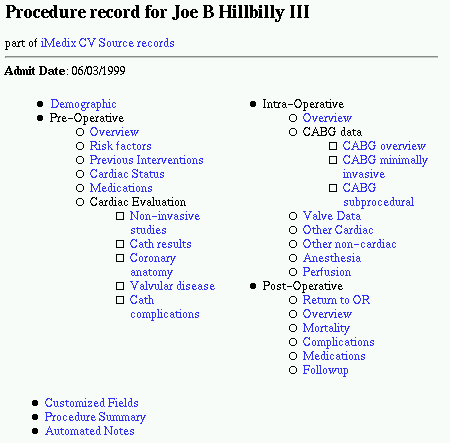
Now we have examined two examples of systems that help a community work together: the photo database, that helps people share their personal work; and the company intranet, that helps coordinate the efforts of a thirty employee company. Next we will look at a site that operates on another scale entirely: a hospital medical records system that organizes the work of hundreds or even thousands of people. On this scale, difficulties of administration similar to the ones we have been examining throughout this essay make their appearance. We will discuss the strategies that can be used to render the administration of a site as large as this one practical and scalable.
The system is intended
to replace hundreds of hospital information systems with a
single Unix machine. The project was a stunning vindication of
ArsDigita's architecture and strategy, for with only a few
programmers on the project they finished the system
months ahead of the competitors. The lead programmer on
the project, Tracy Adams, is a brilliant programmer and a tremendously hard
worker. She was the one who masterminded this site; I would show you a picture
of her if I had one. At
the right we can see an image of one patient record from this system:
it gives an idea of the amount of data that this system handles.
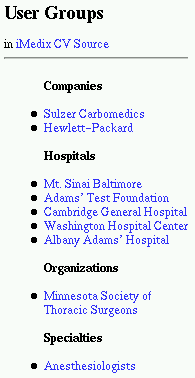
Below we can see an image showing all the groups using the system:
from this we can get an impression of the number and varietyof users
who will use this site. Here is a description of
the system that appeared in a local newspaper article:
AATS, NEW ORLEANS, LA (Monday, April 19, 1999) - iMedix, Inc. today
announced it is the first - and only - clinical outcomes software
vendor to receive the first of two stages of certification by the
prestigious Society of Thoracic Surgeons (STS) for its web-based
product - CV Source.
iMedix enables hospitals, surgeons and other cardiac caregivers to
collect, analyze and compare clinical outcomes via the Internet using
its STS certified product, CV Source. One of the many benefits CV
Source delivers is to help clinicians establish best practices and
provide high quality cardiac care at a lower cost. CV Source is the
only product that is certified to be in compliance with the most
recent STS data collection standards.
"We are thrilled to be the first vendor in the industry to offer a
solution that is recognized and accepted for the essential first stage
of certification by the Society of Thoracic Surgeons. This is a very
significant validation for our customers, because it shows that the
STS has tested and approved of our web-based application model for
collection and analysis of cardiovascular surgery data," said Ern
Blackwelder, CEO of iMedix. "This level of recognition from such an
elite professional society serves as a springboard for us to reach our
ultimate goal - to lead this industry with a technology that provides
unparalleled benefits for our customers and establishes us as the
database innovator and pioneer."
CV Source is the industry's first, and only Internet-based solution
that provides hospitals, physicians, and other health professionals
with real-time clinical outcomes data collection, , analysis, and
comparative reporting tools via web-based technologies, to help
dramatically improve cardiac patient care.
The STS has many stringent requirements for certification of software.
Benefits to members include having confidence that the products offer
features such as improved and simplified core data sets, better
automatic internal data quality checks, standardized export
capabilities to make outcomes data more accessible and useful, and a
new standard method for data harvest.
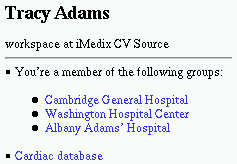 Here we see yet another example of the use of the user's workspace
in a custom application. In this case the workspace shows the
groups of which Tracy is a member, and provides her with
a link to view the cardiac database records (like the
one shown above for Mr. Hillbilly). Since this
system is meant to serve so many patients and doctors,
the user groups system is an important way to ensure that
users sees only the information of concern to them. Tracy
is only allowed to view records from patients associated
with the groups of which she is a member, i.e. patients
at Cambridge General Hospital, Washington Hospital Center,
or Albany Adams' Hospital. As you can see above, there is
a user group defined for each hospital, company, organization or specialty
using the system. When a person joins a user group,
that group is listed on the users workspace. The link for
each group leads to information of concern to that particular group.
Here we see yet another example of the use of the user's workspace
in a custom application. In this case the workspace shows the
groups of which Tracy is a member, and provides her with
a link to view the cardiac database records (like the
one shown above for Mr. Hillbilly). Since this
system is meant to serve so many patients and doctors,
the user groups system is an important way to ensure that
users sees only the information of concern to them. Tracy
is only allowed to view records from patients associated
with the groups of which she is a member, i.e. patients
at Cambridge General Hospital, Washington Hospital Center,
or Albany Adams' Hospital. As you can see above, there is
a user group defined for each hospital, company, organization or specialty
using the system. When a person joins a user group,
that group is listed on the users workspace. The link for
each group leads to information of concern to that particular group.
 A site like this provides a special challenge to
an administrator. The data in this system is sensitive
and valuable. Maintaining the integrity of this data can
be literally a matter of life and death importance. At the
same time, many people need to access and modify
the data to get important work done. How can the administrator
ensure that the system is accessible enough that work
can get done, yet secure enough that valuable data is protected?
A site like this provides a special challenge to
an administrator. The data in this system is sensitive
and valuable. Maintaining the integrity of this data can
be literally a matter of life and death importance. At the
same time, many people need to access and modify
the data to get important work done. How can the administrator
ensure that the system is accessible enough that work
can get done, yet secure enough that valuable data is protected?
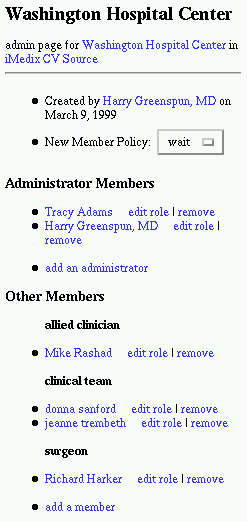
The answer is to use the powerful system of user group roles and permissions associated with the User Group module. Each user group has a number of defined roles. Users within the group are assigned to various roles. Each role has a set of permissions associated with it. In the image to the right you see a number of the roles defined within the Washington Hospital Center, and below you can see a table of the various permissions associated with each of the roles. In this way, the data is protected: for example, a lowly clerical support person cannot damage any of the valuable data. At the same time, it is still accessible to the the people who need it: the surgeon can enter into the system the results of Mr. Hillbilly's heart operation.
Finally, I want to point out that this permissions system adds another a tool to the box of tricks an administrator can draw on if he wants to implement a community-based management scheme. When it is easy to alter the permission level of a user, the most helpful users can be granted a promotion to a higher permission level, while the most expensive users can be demoted to a level where they can no longer cause any damage. In photo.net. the practice of promoting the most helpful users to administrative positions is really a very simple example of this strategy, in a system which has only two permission levels (ordinary user and administrator). I wanted to show off the elaborate permission system from the iMedix site to suggest how much farther this basic strategy can be taken.
I do not think the iMedix
system would ever use the strategy I am suggesting,
but this is simply because the community it
serves is made up of people who
work together in the non-virtual world too.
The decisions about the promotion or demotion of members will be made
off-line. That is to say, the community probably does manage itself
in the way I suggest: able allied clinicians will get promoted to the clerical
team, while careless surgeons will be directed to turn over
their data to the data
entry people for input into the system. However, these promotions and
demotions are not brokered by the site administrator, because they can
be handled
perfectly well in the non-virtual world by people who see each other
every day. However, if a system of this size and complexity were
built to coordinate the efforts of a group of people who were
entirely separated in time and space, it would need an administrator-mediated
system to handle these questions of authority and promotion. It
is exactly these subtle questions of managing a community that
the ArsDigita Community Toolkit is designed to enable the administrator to
manage.
| Role \\ Action | administrate | clinical_entry | data_report | data_review | demographic_entry |
|---|---|---|---|---|---|
| administrator | Allowed | Allowed | Allowed | Allowed | Allowed |
| allied clinician | Denied | Denied | Denied | Allowed | Denied |
| clerical support | Denied | Denied | Denied | Denied | Allowed |
| clinical team | Denied | Allowed | Denied | Allowed | Allowed |
| data analyst | Denied | Denied | Allowed | Denied | Denied |
| data entry | Denied | Allowed | Denied | Allowed | Allowed |
| surgeon | Denied | Allowed | Allowed | Allowed | Allowed |
It is my hope that the examples in this section make this philosophy clear enough that an administrator can figure out how to use it to tackle the entirely new problems that he may encounter in the novel Internet applications of the future. For of course, not every site is going to fall exactly into one of these three categories or have exactly one of these three types of problems. This is why it is useful to keep in mind the general philosophy of managing a community: sites' requirements and capabilities may change, but the basic problems of managing a group of people remains the same, whether one is running an old-fashioned corner store or the most novel new ground-breaking Internet concern.
I also hope I have succeeded in communicating to the reader how the many different examples of Internet applications presented in this section all have a common core of functionality. As one can see from the examples above, the most impressive sites all share the feature that they can be tailored to the individual user. It adds tremendous power to an Internet application if the site knows who the user is and can present him features and information tailored to his personal goals. In a publishing site, this means that the system keeps track of all the submissions by a single user; in an ecommerce site, this means prices, offers, reviews, and even the product itself can be customized to the user; and in a site built for people working together, it means the system can offer each user a private private workspace from which he can manage his personal contribution to the project. In each case, the specific features are different, but the underlying engine that supports this ability is the same. One can see the elements of this common engine cropping up over and over again: the user directory and the community member history page, the user workspace, the user group system, and the member value tools. These elements are useful in any site that needs to support the activities of a community.
Though the modules described in this section form the backbone of most
sites built with the ArsDigita Community Toolkit,
this is not the end of the story of toolkit features that can be useful in
a wide range of sites. In the next section we will turn to examine the
toolkit features that enable community member interactions, and we will
show off a variety of sites that have made use of these features.